

Blackmagic Design Fairlight Console Audio Editor
$6,295.00
Fairlight Console Audio Editor with Custom Keyboard, Touch-sensitive Controls, 5 Auto-switching Layouts, Plug-in Support, and Ethernet Connectivity
Available for backorder
Fast, Precise Fairlight Audio Editing
For professional sound editors, maximizing advantages is crucial to ensure flawless audio delivery within demanding post-production timelines. Enter the Blackmagic Design Fairlight Console Audio Editor. A standalone desktop audio control surface that connects to the Fairlight DaVinci Resolve computer via Ethernet, the Console Audio Editor provides the speed and precision to meet crushing deadlines. Leveraging Fairlight’s decades of audio post expertise, all the elements of the Fairlight Console Audio Editor are fluidly integrated for maximum efficiency. Forget the mouse and step up to the ultimate in fast, accurate editing with the Blackmagic Design Fairlight Console Audio Editor!
Deliver perfect audio on tight deadlines
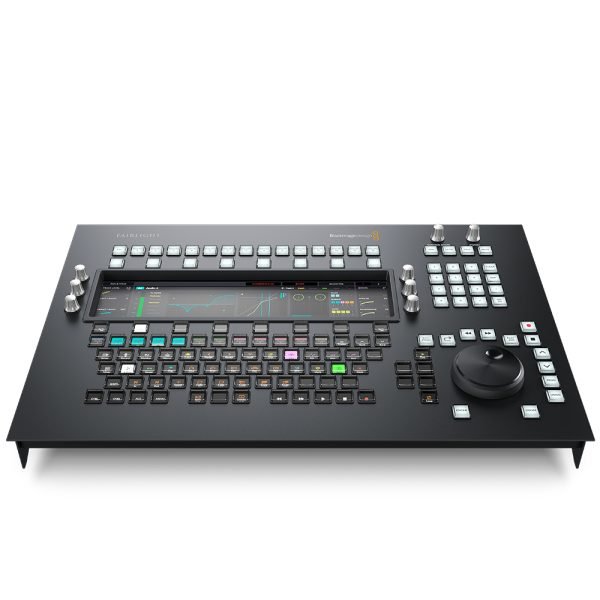
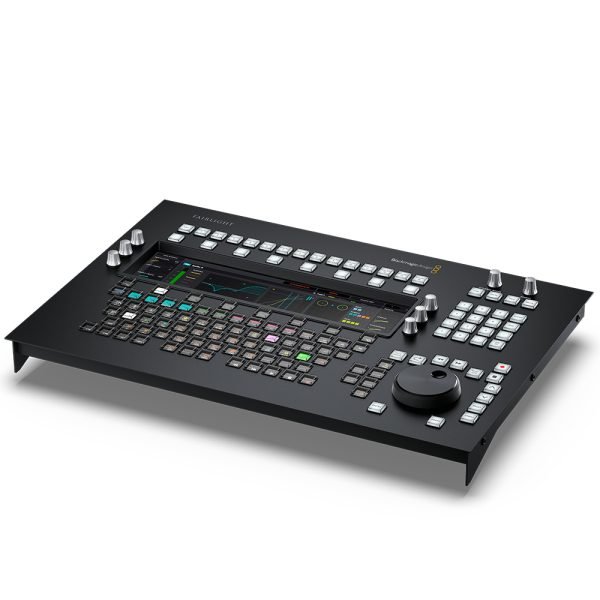
Here at City Music, we’ve quickly discovered the Blackmagic Design Fairlight Console Audio Editor’s innovative design facilitates quick, accurate editing. Five “Layouts” cover all aspects of the audio editing process: Standard Mixing, Clip EQ, Plug-ins, Aux Sends, and Monitor Mode. It also features an interactive LCD, touch-sensitive control knobs, transport controls, programmable macro buttons, a number pad, a smart search dial with an electronic clutch, and a full keyboard with multifunction picture keys that change automatically based on the current task mode. The 12-inch LCD automatically switches between the five Layouts as you tackle different tasks, seamlessly adapting to your workflow by immediately displaying all relevant information clearly and concisely.
Five Layouts cover all aspects of audio editing
With its five Layouts, the Fairlight Console Audio Editor stands at the ready for all of your audio editing needs. The Standard Mixing layout gives you control over the selected track, including level, panning, metering, 6-band track EQ, dynamics, and more. The Clip EQ layout provides control over 4-band parametric equalizer parameters for the selected clip. In the Plug-ins layout, you get full plug-in support with bypass, reset, preset loading/saving, and parameter mapping to any of the editor’s six rotary knobs. In the Aux Sends layout, you can see all of your send levels and pan pots for up to 24 auxiliary channels simultaneously. Using soft buttons arranged at the top of the screen, you can enable/disable aux channels for active tracks. Lastly, the Monitor Mode layout gives you visual feedback for set and dimmed levels, along with control room, loudness, and studio metering. It also displays a graphical depiction of your studio speaker configuration.
Blackmagic Design Fairlight Console Audio Editor Features:
- Connects to Fairlight DaVinci Resolve computer via Ethernet
- 12-inch interactive LCD
- Touch-sensitive control knobs
- 5 auto-switching Layouts: Standard Mixing, Clip EQ, Plug-ins, Aux Sends, and Monitor Mode
- Standard Mixing layout controls the selected track, including level, panning, metering, 6-band track EQ, and dynamics
- Clip EQ layout controls 4-band parametric equalization parameters for the selected clip
- Plug-ins layout features full plug-in support with bypass, reset, preset loading/saving, and parameter mapping to rotary pots
- Aux Sends layout allows you to see all of your send levels and pan pots for up to 24 auxiliary channels simultaneously
- Monitor Mode layout provides visual feedback for set and dimmed levels, along with control room, loudness, and studio metering
- Custom keyboard with auto-labeling multifunction picture keys
- Programmable Macro keys
- Transport controls with search dial
- Ethernet port supports 10/100/1000 Base-T
- USB Type C port for configuration and software updates
- Settings control: Fairlight Studio and Console setup utility software when connected by USB
- Power Usage: 20W maximum
- Internal power supply, 100/240V AC 50/60Hz with IEC C14 mains input
- Operating systems: macOS 10.15 Catalina or later, Windows 10 (64-bit)
- 1-year limited manufacturer’s warranty
| Type | Control Surface |
|---|---|
| Screen | 12" LCD |
| USB | 1 x USB-C |
| Data I/O | 3 x Ethernet |
| OS Requirements - Mac | macOS 10.15 or later |
| OS Requirements - PC | Windows 10 or later |
| Power | Standard IEC AC Cable |
| Height | 2.75" |
| Width | 19.29" |
| Depth | 13.46" |
| Weight | 19.24 lbs. |
You must be logged in to post a review.




Reviews
There are no reviews yet.